
Power BI
Reports and dashboards. Numbers from Excel, ERP, machines or SQL in one report that refreshes itself. Click a machine and the whole report filters.
- Downtime, scrap, availability
- Revenue per customer and item
- On-time delivery and open orders
We build Power BI reports, small apps for phone and tablet, automated workflows and Excel workbooks that calculate instead of copying. No big IT change, inside the Microsoft 365 you already have.
The tools come from Microsoft and run in your existing Microsoft 365. We set them up for your company, build the first solutions and show your people how to carry on themselves.
Reports and dashboards. Numbers from Excel, ERP, machines or SQL in one report that refreshes itself. Click a machine and the whole report filters.
Your own apps without programming. Forms for phone and tablet that store data where your company needs it: SharePoint, Excel or Dataverse.
Workflows that run by themselves. When something happens, the next step follows automatically: a message, an approval, an entry, a reminder.
Complex workbooks that calculate. Costing, shift plan, gauge list: with Power Query, XLOOKUP and pivot tables, built cleanly so the next person understands them too.
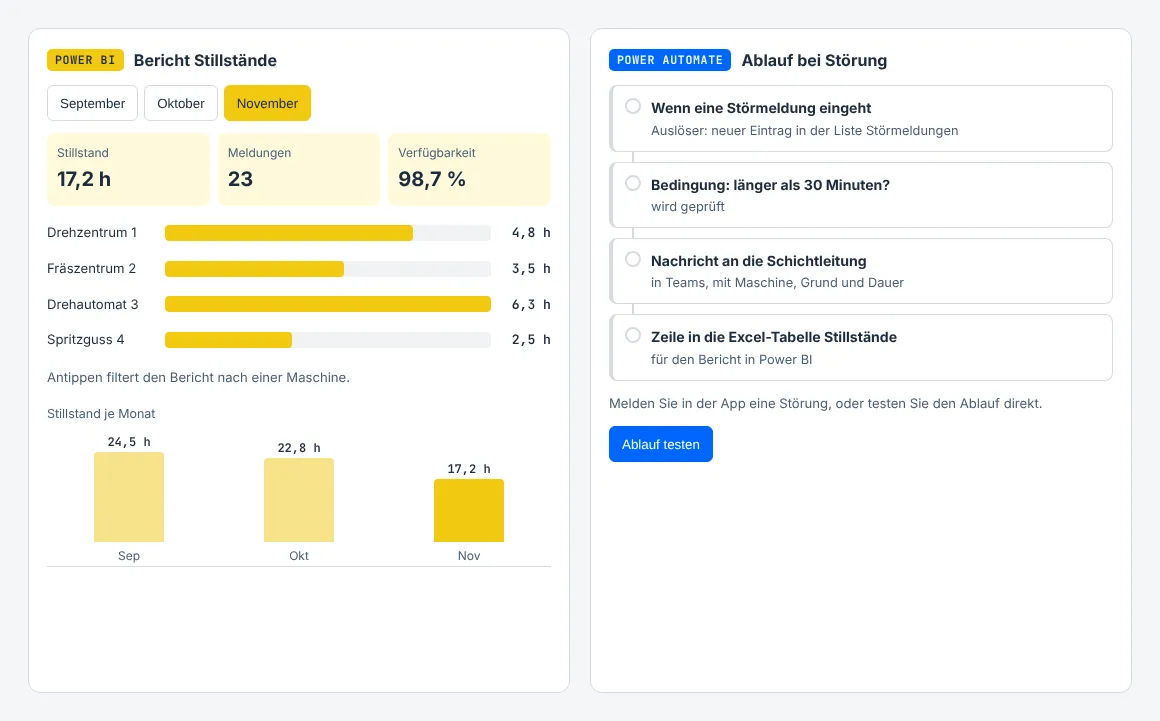
Browser mock-ups with sample data, so you can see how the solutions feel. Report a stop in the app, the flow next to it starts and the report counts along. The report has three pages, the workbook a sheet with scenarios.
| Machine | Downtime h | Reports | Ø min | Availability |
|---|
Tap a bar to filter every visual and page.
| Start | Duration | Status |
|---|
Report a stop over 120 minutes in the app: the flow then asks the shift lead.
Tap a cell to see its formula| A | B | |
|---|---|---|
| 1 | Quantity | |
| 2 | Minutes per part | |
| 3 | Setup time (min) | |
| 4 | Shifts per day | |
| 5 | Machine time (h) | |
| 6 | Setup share | |
| 7 | Working days |
What-if: working days per quantity and shift model. Green up to 3 days, yellow up to 10, red above.
| Pieces | 1 shift | 2 shifts | 3 shifts |
|---|
Worked example without prices. Your workbook holds your machines, rates and shift models.
Mock-ups for illustration, not Microsoft software. Microsoft, Microsoft 365, Excel, Power BI, Power Apps and Power Automate are trademarks of the Microsoft group of companies. STATECHPRINT is not a Microsoft partner.
Typical solutions for manufacturing companies, the way we build them. Each one is small enough to run within a few days.
The operator reports on the tablet, the shift lead gets a message, the report shows downtime per machine and reason.
Photograph the delivery note on the phone, pick the purchase order. The flow files the photo and tells purchasing about deviations.
Attachments from the invoice mailbox land named in the right folder, accounting gets a list to approve.
The gauge list sends a reminder 30 days before each calibration, with owner and date.
Request in the app, approval with one click in Teams or by mail, entry in the calendar.
Revenue, on-time delivery and open orders from ERP and Excel, current every morning instead of once a month by hand.
Tell us what you work with today. In a first call at no cost we show you how the solution could look in your Microsoft 365.
Stanislav Stamenkovic · +49 2051 4230033 · info@statechprint.de
Power Apps and Power Automate are made for people who know their process, not for programmers. The principle is called citizen development: the supervisor builds the checklist for her department, the buyer the approval flow.
To keep it tidy we set up the framework: separate environments for testing and production, rules on which data may go where, a list of who owns which app. We build the first solutions with you, train your people and stay your contact when it gets tricky.
30 minutes about your lists, reports and workflows.
A first report or app with your data, before you decide.
Fixed price for the build or a block of hours, stated openly in the quote.
Training on site and support.
Often not to begin with. Power Apps and Power Automate with standard connectors are included in many Microsoft 365 Business licences, Power BI Desktop is free. Sharing reports usually needs Power BI Pro, some connections need premium licences. What exactly you need we clarify in the first call.
Specialists in your company build small apps and flows themselves, without programming skills. We set up the framework, build the first solutions with them and train your people so they can carry on themselves.
No. The tools run in your existing Microsoft 365. Data stays in SharePoint, Excel, Dataverse or your ERP; we only connect what belongs together.
Yes. We tidy up existing workbooks, merge several files with Power Query and turn them into a costing or report the next person understands too. On request it later becomes a report in Power BI.
I am preparing for the Microsoft certifications for Power BI and the Power Platform and work to the principles they test. STATECHPRINT is not a Microsoft partner.
It depends on the scope. After the call and a first prototype you get a fixed price or a block of hours, shown openly in the quote. The first call costs you nothing.
Stanislav Stamenkovic · +49 2051 4230033